
バリデーションでエラーになった際に入力内容を保持してくれるのは嬉しいですが、画面を初期表示した際に特定の値を表示したい時に参考になると思います。
目次
oldヘルパーに初期値を設定し、初期表示する
方法としては、oldヘルパーの第二引数に初期表示したい値を設定するだけです。
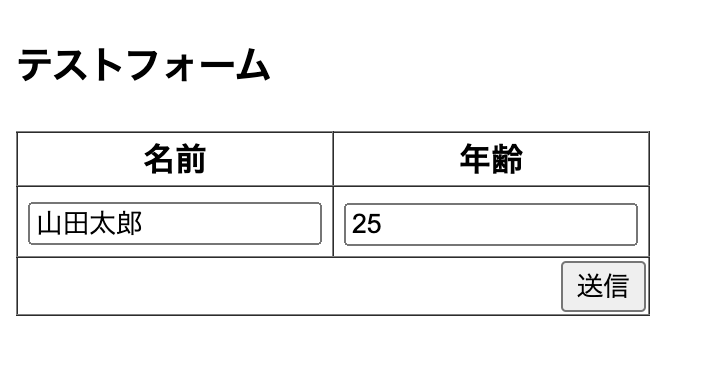
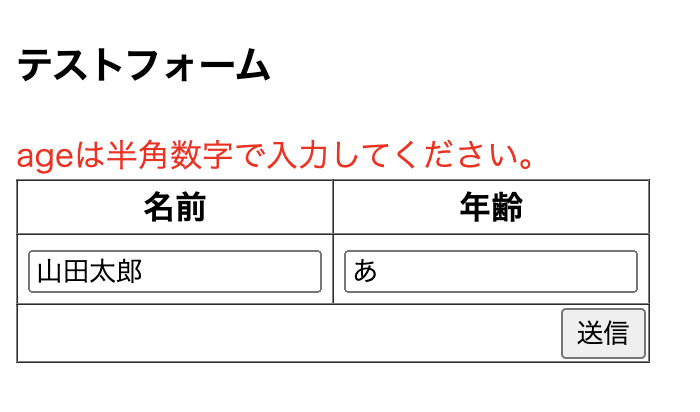
Controller
<?php

namespace App\Http\Controllers;

use Illuminate\Http\Request;
use App\Models\users;
use Illuminate\Support\Facades\Validator;

class BlogController extends Controller
{
    public function gettest(Request $request) {
        //  初期値を定義する
        $forms = [
            'name' => '山田太郎',
            'age'  => 25,
        ];

        return view('test', [
            'forms' => $forms
        ]);
    }

    public function posttest(Request $request) {
        //  バリデーション
        $validated = $request->validate([
            'name'  => 'max:10',
            'age'   => 'numeric',
        ]);
    }
}
blade
<!DOCTYPE html>
<html lang="{{ str_replace('_', '-', app()->getLocale()) }}">
    <head>
        <meta charset="utf-8">
        <meta name="viewport" content="width=device-width, initial-scale=1">

        <title>Laravel</title>

        <!-- Fonts -->
        <link rel="preconnect" href="https://fonts.bunny.net">
        <link href="https://fonts.bunny.net/css?family=figtree:400,600&display=swap" rel="stylesheet" />
    </head>
    <style>
        tbody tr td{
            padding: 5px;
        }
    </style>
    <body>
        <h3>テストフォーム</h3>
        {{-- エラー表示 --}}
        @foreach ($errors->all() as $error)
            <div style="color: red;">{{$error}}</div>
        @endforeach
        <form action="{{ route('posttest') }}" method="POST">
            @csrf
            <input type="hidden" name="input_flg" value="0">
            <table border="1" style="border-collapse: collapse;" id="table">
                <thead>
                    <tr>
                        <th>名前</th>
                        <th>年齢</th>
                    </tr>
                </thead>
                <tbody>
                    <tr>
                        {{-- oldヘルパーの第二引数に初期値を設定する --}}
                        <td><input type="text" name="name" value="{{old('name', $forms['name'])}}"></td>
                        <td><input type="text" name="age" value="{{old('age', $forms['age'])}}"></td>
                    </tr>
                </tbody>
                <tfoot>
                    <tr>
                        <td colspan="2" style="text-align: end;">
                            <input type="submit" value="送信">
                        </td>
                    </tr>
                </tfoot>
            </table>
        </form>
    </body>
</html>